
Why GA4 Shows Direct Traffic From Lanzhou, China (And Why Filtering It Won’t Hurt AI Visibility)
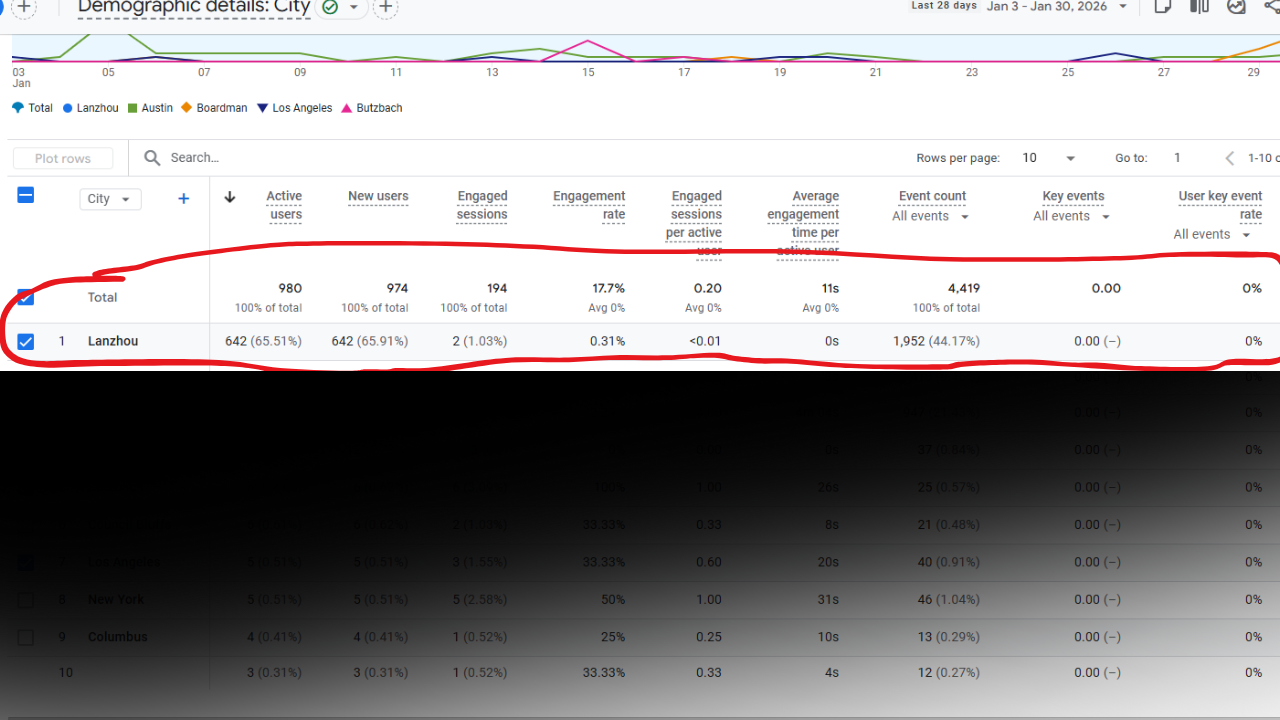
If you are seeing a sudden spike in “Direct” traffic in Google Analytics 4 coming from Lanzhou, China, often alongside Singapore, you are not alone. This pattern began appearing across many websites globally in late 2025 and has continued into 2026.
At first glance, this traffic can look alarming. It often appears in large volumes, shows no engagement, and raises concerns about whether filtering or blocking it could harm SEO or reduce AI visibility.
The reality is simpler and far less risky than it appears.
This traffic is not coming from real users, and filtering it does not prevent legitimate AI systems from discovering, indexing, or recommending your content.
This article explains what this traffic is, why Lanzhou appears so frequently, how to confirm what you are seeing inside GA4, and how to clean your analytics without damaging search or AI-driven discovery.
Last updated: January 2026
Quick Summary
-
Lanzhou Direct traffic in GA4 is inauthentic bot activity
-
It does not represent real users or meaningful AI discovery
-
Much of it never loads your website at all
-
Filtering it improves analytics accuracy
-
GA4 filters and responsible bot blocking do not reduce SEO or AI visibility
What This Lanzhou Direct Traffic Actually Is
The traffic pattern most site owners see shares a consistent set of characteristics:
-
Appears almost entirely as Direct traffic
-
Originates heavily from Lanzhou, China, often paired with Singapore
-
Shows 0-second engagement time
-
Has near-100 percent bounce rates
-
Uses outdated operating systems, such as Windows 7 or older Windows 10 builds
Taken together, these signals indicate automated, non-human activity rather than real visitors.
In many cases, this traffic does not even reach your website. Instead, it sends requests directly to your GA4 Measurement ID. GA4 records the hit without a page load, which creates what is commonly referred to as ghost traffic.
Because there is no referring source or page view, GA4 classifies these sessions as Direct traffic.
Why Lanzhou Appears So Often
Lanzhou is associated with large data center and cloud infrastructure activity. These environments are frequently used for automated traffic and analytics spam.
The activity generally falls into two categories:
-
Analytics ghost traffic
Bots send hits directly to GA4 without loading pages, creating sessions with no behavior. -
Automated infrastructure activity
Servers used for scraping, testing, or bulk automation unrelated to search indexing or AI recommendations.
In both cases, this traffic does not represent people reading your content, engaging with your site, or buying from you.
Why This Is Not the AI Traffic You Want
A common concern is whether filtering or blocking this traffic could reduce AI visibility or prevent AI systems from surfacing your content.
It will not.
Legitimate AI and search discovery behaves very differently:
-
Verified crawlers identify themselves via known user agents
-
They respect robots.txt
-
They load real pages
-
They generate organic or referral traffic, not Direct ghost sessions
-
They are allowlisted by infrastructure providers such as Cloudflare
The Lanzhou Direct traffic does none of this. It does not read content, index pages, generate citations, or influence rankings. Removing it from analytics does not remove your site from AI systems.
How This Traffic Affects Your Data
While this traffic does not harm SEO, it does harm analysis and decision-making.
It can:
-
Inflate Direct traffic metrics
-
Distort geographic reporting
-
Mask legitimate AI referrals
-
Make engagement metrics unreliable
-
Lead to optimization decisions based on non-existent demand
The risk is not filtering it out. The risk is trusting polluted data.
How to Confirm This Traffic in GA4
You can verify that this traffic is inauthentic by checking for the following signals inside GA4:
-
High traffic volume from Lanzhou, China or Singapore
-
Acquisition reports showing traffic as almost entirely Direct
-
Engagement time of 0 seconds
-
Bounce rates close to 100 percent
-
Missing or mismatched hostnames
When these indicators appear together, the traffic is not coming from real users or meaningful crawlers.
How to Clean Your Analytics Without Hurting AI Visibility
You can safely reduce or remove this noise using a combination of reporting filters and responsible bot mitigation.
GA4 filters and comparisons
-
Exclude sessions with zero engagement
-
Segment out traffic that does not meet basic interaction thresholds
These filters affect reporting only. They do not block visitors or crawlers.
Hostname filtering
-
Limit GA4 data to sessions where the hostname matches your domain
This is one of the most effective ways to remove ghost traffic.
Infrastructure-level bot protection
-
Enable Cloudflare’s Bot Fight Mode
This blocks known bad bot signatures while allowing search engines and legitimate AI crawlers.
What you should avoid:
-
Blocking all bots
-
Blocking entire countries by default
-
Using aggressive firewall rules without allowlists
These approaches are unnecessary and can interfere with legitimate access.
Key Terms
-
Ghost traffic: Analytics hits sent without loading a webpage
-
GA4 Measurement ID: The identifier used to send events to Google Analytics 4
-
Bot Fight Mode: A Cloudflare feature that blocks known malicious bots
-
AI crawlers: Verified bots used by search engines and AI systems to discover content
What Not to Do
-
Do not assume high traffic volume equals real interest
-
Do not optimize content based on sessions with no engagement
-
Do not delete historical data without understanding the cause
-
Do not block bots indiscriminately
Frequently Asked Questions
Does blocking Lanzhou traffic hurt SEO?
No. This traffic does not load pages or engage with content. Filtering or blocking it does not affect search rankings.
Will GA4 filters reduce AI visibility?
No. GA4 filters only change reporting. They do not block crawlers or visitors.
Is Lanzhou traffic used to train AI models?
In most cases, no. Much of this traffic never loads website content and consists of analytics pings or automated infrastructure noise.
Should I block traffic from China entirely?
No. Country-level blocking can prevent legitimate crawlers and users from accessing your site and should be avoided unless you have a specific security reason.
Why does this traffic show as Direct in GA4?
Because ghost traffic bypasses page loads and sends hits directly to your GA4 Measurement ID, GA4 classifies it as Direct.
How can I tell if traffic is real or fake?
Real traffic includes page views, engagement time, valid hostnames, and diverse referral sources. Ghost traffic does not.
Final Takeaway
If you are seeing large volumes of Direct traffic from Lanzhou with zero engagement, you are not losing AI visibility by filtering it.
You are removing noise.
Legitimate AI discovery comes from crawlers that load pages, respect site rules, and generate meaningful signals. Cleaning your analytics allows you to see and optimize for those signals clearly.

