
Kajabi 2026: More Than a Course Platform
As a Monday through Friday Kajabi tutor, I hear the same questions from coaches, consultants, and course creators deciding whether Kajabi fits their business model.
Some people assume Kajabi is only for hosting online courses. The platform now supports multiple types of digital businesses including coaching programs, communities, digital products, and membership sites.
Below are the most common questions people ask before starting with Kajabi.
What is Kajabi?
Kajabi is a platform designed to turn knowledge, expertise, and professional experience into a structured online business.
Many professionals use Kajabi to deliver and sell:
-
online courses
-
coaching programs
-
membership communities
-
digital downloads
-
group programs
-
workshops and live events
The platform allows someone to package their expertise into products and services that generate income beyond one-to-one time.
How to Start on Kajabi and What to Setup First →
Why Kajabi Is Considered an All-In-One Business Platform
Kajabi combines tools that usually require several separate platforms.
Inside Kajabi you can:
-
build website pages and landing pages
-
host and manage your email contact list
-
create online courses or coaching programs behind a paywall
-
run group coaching or one-to-one sessions
-
store and replay coaching session recordings
-
host a community forum with feeds, meetups, and challenges
-
automate opt-in, purchase, and onboarding emails
-
collect payments through Stripe or PayPal
-
offer subscriptions, payment plans, and one-time payments
-
segment email contacts based on actions such as clicks or form submissions
-
create webinar funnels and launch campaigns
For many businesses, Kajabi replaces separate tools for websites, email marketing, course hosting, and checkout systems.
Kajabi FAQ
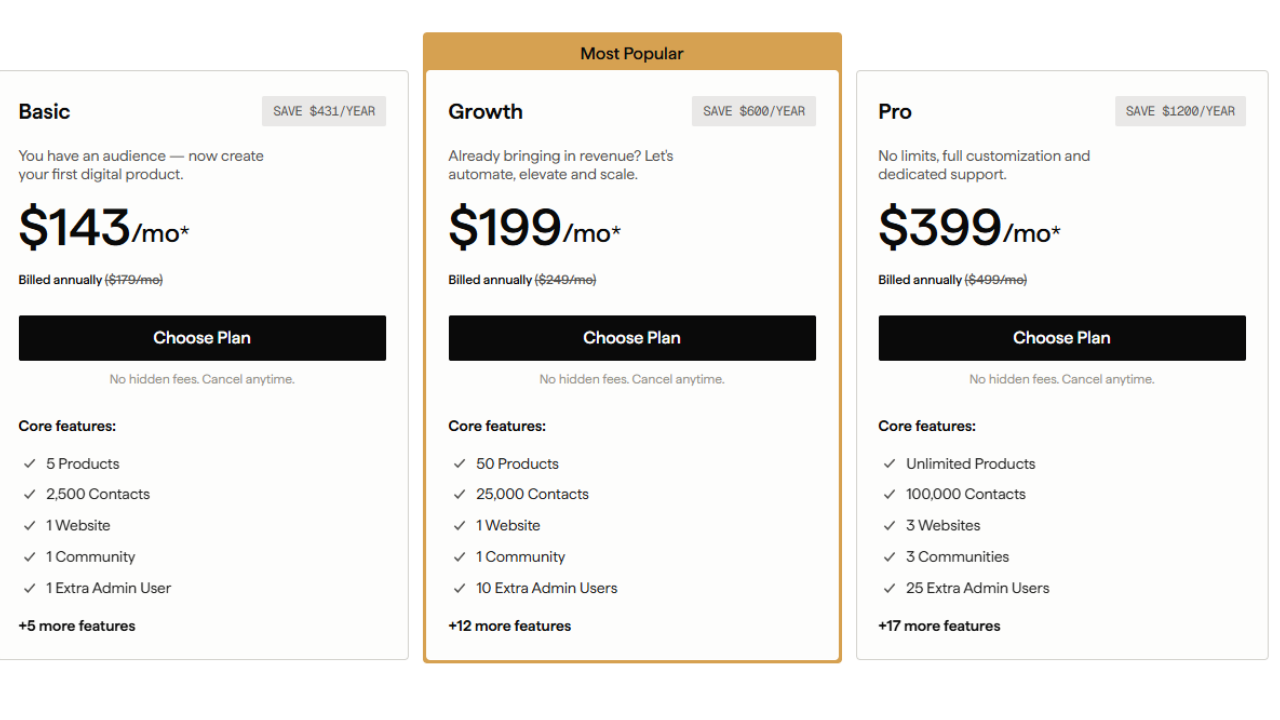
Which Kajabi plan should I choose?
Many people are unsure which Kajabi plan to select before launching their program.
Starting with the Basic plan works well for most new businesses.
The Basic plan includes:
-
up to 10,000 email contacts
-
unlimited website pages
-
three products such as a course, coaching program, or community
-
up to 1,000 paying customers
Upgrading plans can be done instantly inside the account dashboard. Downgrades can be requested through Kajabi support.
Should I move my existing website to Kajabi?
Migrating your website to Kajabi is optional.
Some professionals keep their existing website and use Kajabi only for:
-
course delivery
-
community hosting
-
email marketing
-
checkout pages
Your sales page can remain on your current website with checkout buttons connected to Kajabi.
Others move their full website to Kajabi to avoid paying for multiple platforms. The decision depends on cost, design preferences, and how integrated you want your systems to be.
Should I keep Mailchimp or move my contacts to Kajabi?
Kajabi includes built-in email marketing tools.
Inside Kajabi you can:
-
send broadcasts and automated campaigns
-
tag and segment contacts
-
track open and click rates
-
trigger automations from links or form submissions
Because these features already exist inside the platform, many businesses move their email contacts directly into Kajabi.
Mailchimp can still be integrated using a connector such as Zapier, although most users prefer managing contacts in one system.
Do I need to purchase a Kajabi website template?
Templates are optional.
Kajabi includes a website builder with customizable sections and layouts. Many templates sold online are designs that can be recreated directly inside the platform.
Some people choose templates for design inspiration. Others hire a designer or learn to build their site using Kajabi’s built-in editor.
How easy is it to build a course in Kajabi?
Courses inside Kajabi follow a simple structure.
Content is organized into:
-
Modules – groupings of lessons
-
Lessons – individual pieces of content
Each lesson can include:
-
a video or audio file
-
downloadable resources such as PDFs
-
written text instructions
-
optional quizzes
Courses can be delivered in different formats:
-
full access immediately
-
scheduled release (drip content)
-
locked progression where students complete previous lessons before moving forward
Can I add quizzes and workbooks to a Kajabi course?
Kajabi includes quiz features inside the lesson builder.
Quiz formats include:
-
multiple choice
-
short answer
-
file upload
Quizzes can be graded or ungraded, and a passing score can be required before a student continues to the next lesson.
Workbooks, worksheets, and guides can also be attached as downloadable files within lessons.
Does Kajabi handle marketing for me?
Kajabi provides marketing tools but does not perform marketing for your business.
The platform includes:
-
email campaigns
-
landing pages
-
checkout pages
-
automation workflows
-
funnel templates
Traffic generation and audience growth still depend on your content, outreach, and marketing strategy.
What businesses are not a good fit for Kajabi?
Kajabi may not be ideal in a few scenarios.
For example:
-
businesses giving away all content for free
-
email lists larger than 100,000 contacts without external email software
-
stores focused on physical product sales
Kajabi is designed primarily for knowledge-based digital businesses.
What businesses are a good fit for Kajabi?
Kajabi works well for professionals offering expertise through digital products and services.
Examples include:
-
online courses
-
membership communities
-
group coaching programs
-
consulting programs
-
digital downloads
-
educational workshops
Payment structures can include:
-
one-time payments
-
subscriptions
-
payment plans
-
free or paid trials
-
optional setup fees
Is Kajabi good for SEO?
Kajabi pages include SEO settings such as:
-
page titles and descriptions
-
search preview images
-
customizable URLs
-
image alt text
Blogging remains one of the strongest ways to generate search visibility. Many Kajabi users publish weekly blog posts that expand on topics from their YouTube videos, podcasts, or written content.
Can Kajabi accept payments?
Kajabi integrates with payment processors such as Stripe and PayPal.
Payments can be accepted through:
-
credit cards
-
Apple Pay
-
Google Pay
-
Afterpay
-
PayPal
Kajabi does not charge transaction fees. Payment processors typically charge under three percent per transaction.
How strong is Kajabi email segmentation?
Kajabi includes detailed segmentation options.
Emails can be filtered by:
-
purchases
-
form submissions
-
link clicks
-
event registrations
-
coupon use
-
contact tags
-
course completion
Segmentation allows targeted messaging based on user behavior.
Can I record videos inside Kajabi?
Kajabi allows video recording for coaching and community interactions.
You can:
-
host one-to-one coaching sessions
-
record course content
-
run community meetups
Live webinars intended for public viewing are typically hosted on platforms such as Zoom, then uploaded into Kajabi for replay access.
Does Kajabi have a mobile app?
Kajabi offers a mobile app available in both the Apple App Store and Google Play.
Students log in to access:
-
courses
-
coaching programs
-
communities
Kajabi also offers an optional branded mobile app upgrade for businesses that want their own custom application.
Kajabi Compared to Other Platforms
How to Start on Kajabi and What to Setup First →
Udemy vs Kajabi
Udemy is a course marketplace. Kajabi is a business platform.
Udemy hosts your course but controls the customer relationship and takes a large commission. Kajabi allows you to own your audience, control pricing, and market additional products.
Squarespace vs Kajabi
Squarespace is a website builder. Kajabi includes website building but is designed for delivering courses and memberships.
Course delivery inside Squarespace often requires workarounds such as password-protected pages.
WordPress vs Kajabi
WordPress allows almost any type of website but requires plugins for course hosting, email marketing, and checkout systems.
Kajabi includes those tools in a single platform.
Mailchimp vs Kajabi
Mailchimp focuses on email marketing. Kajabi combines email marketing with course hosting, funnels, websites, and checkout systems.
Teachable vs Kajabi
Teachable focuses on simple course hosting. Kajabi supports a full online business including marketing funnels, websites, blogs, and automation.
Final Thoughts on Kajabi in 2026
Kajabi has evolved from a course platform into a complete business platform for knowledge-based entrepreneurs.
The platform combines tools for:
-
website building
-
course delivery
-
email marketing
-
automation
-
payments
-
community engagement
For coaches, consultants, and digital educators, Kajabi allows the entire customer journey to run from one system.
As a Kajabi tutor, I help professionals set up these systems and structure their offers inside the platform.
If you have questions about how Kajabi fits your business model, you can schedule a consultation to walk through the setup step by step.
Disclaimer: I am an independent Kajabi Partner and may receive referral payments from Kajabi. All opinions expressed here are my own and are not official statements from Kajabi.

